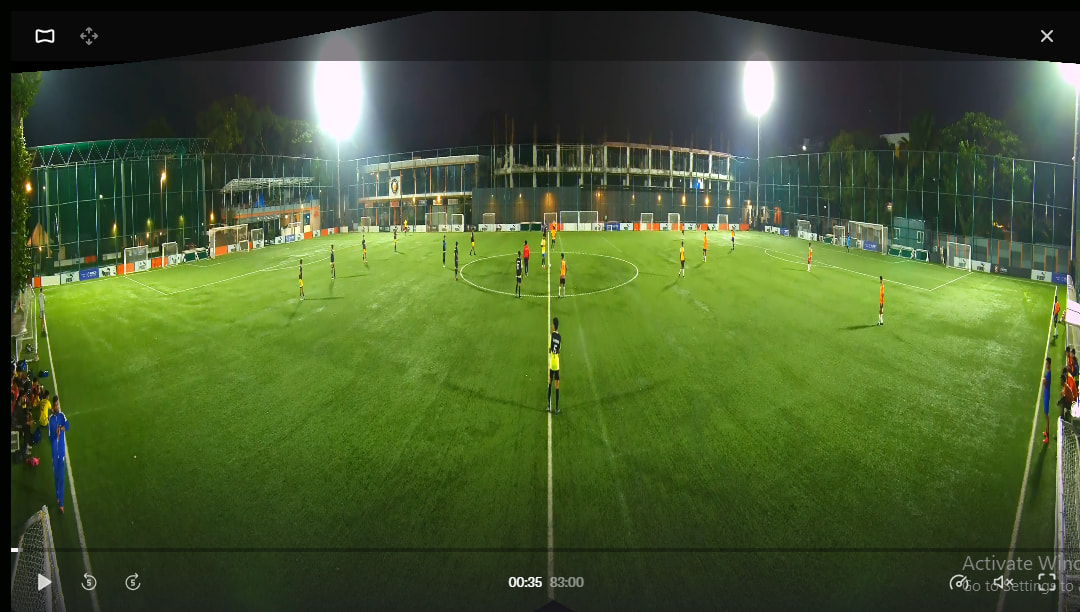
I am wondering is it possible using this software to create the panoramic view from VEO.
Example of screenshots from VEO are at the following Reddit Thread.
When clicking to Interactive mode in VEO it presents an option to view a stiched panoramic view. The MP4 video that is behind it is a view of the left & right camera on top of each other in one video file.
Any help would be appreciated.
Cheers
1 Like
Hi,
I assume you mean this view:
Currently, no. You can only achieve the other panoramic view, where you can zoom and pan.
If it’s worth it, I can spend some time to figure it out. Shouldn’t take me much. Just a matter of homography as the guy said in the Reddit comments.
I am curious on why you’d want that view. For analysis purposes? Or for running an AI on it?
Yes the view that you have shown.
Main reason is right now is analysis. At times we place the VEO cam behind the goal to get a movement view. We also use another video platform were we stack our angles on top of each other. When the cam is behind the goal and the follow cam kicks in there is no width to see shape & movement of players.
When you click on the interactive icon on VEO it creates a JSON file called panorama/camera_alignment. This seems to be the variables for stitching the top/bottom angle together. Here are two of the JSON files from two different videos.
https://pastebin.com/jDkKQU4X
https://pastebin.com/LjYwHJCh
Oh right so the movement of the defense line? Interesting.
But what stops you from using the view from Veo’s website? Why would you want it to be in the software?
The view from VEO zooms in on the ball so doesn’t cover the whole area in front of goal.
I can take the top/bottom view and split into left right but struggled to stitch together